How To: Kill User Sessions in Oracle
Not a long time ago we started to write auto-tests for testing our new product – dbForge Data Compare for Oracle. To recreate a schema in Oracle all user sessions should be killed.
To achieve this we’ve written the following PL/SQL script:
DECLARE
    PROCEDURE KILL_ALL_USER_SESSION_DBMS_SQL(P_USERNAME_SESSION IN VARCHAR2 := '')
    IS
    V_CURSOR_NAME_SESSION NUMBER := DBMS_SQL.OPEN_CURSOR;
    V_STMT_SESSION VARCHAR2(500) := 'SELECT SID AS SID, SERIAL# AS SERIAL
        FROM V$SESSION
        WHERE USERNAME IS NOT NULL AND USERNAME = '||''''||P_USERNAME_SESSION||'''';
    V_EXEC_SESSION NUMBER;
    V_SID_SESSION NUMBER;
    V_SERIAL_SESSION NUMBER;
    V_CURSOR_NAME_SESSION_KILL NUMBER;
    V_STMT_SESSION_KILL VARCHAR2(500);
    V_EXEC_SESSION_KILL NUMBER;
    BEGIN
        DBMS_SQL.PARSE(V_CURSOR_NAME_SESSION, V_STMT_SESSION, DBMS_SQL.NATIVE);
        V_EXEC_SESSION := DBMS_SQL.EXECUTE(V_CURSOR_NAME_SESSION);
        DBMS_SQL.DEFINE_COLUMN(V_CURSOR_NAME_SESSION,1,V_SID_SESSION);
        DBMS_SQL.DEFINE_COLUMN(V_CURSOR_NAME_SESSION,2,V_SERIAL_SESSION);
        LOOP
            EXIT WHEN DBMS_SQL.FETCH_ROWS(V_CURSOR_NAME_SESSION) = 0;
            DBMS_SQL.COLUMN_VALUE(V_CURSOR_NAME_SESSION,1,V_SID_SESSION);
            DBMS_SQL.COLUMN_VALUE(V_CURSOR_NAME_SESSION,2,V_SERIAL_SESSION);
            V_STMT_SESSION_KILL := 'ALTER SYSTEM KILL SESSION '''
                ||V_SID_SESSION||','||V_SERIAL_SESSION||'''';
            V_CURSOR_NAME_SESSION_KILL := DBMS_SQL.OPEN_CURSOR;
            DBMS_SQL.PARSE(V_CURSOR_NAME_SESSION_KILL, V_STMT_SESSION_KILL, DBMS_SQL.NATIVE);
            V_EXEC_SESSION_KILL := DBMS_SQL.EXECUTE(V_CURSOR_NAME_SESSION_KILL);
            DBMS_SQL.CLOSE_CURSOR(V_CURSOR_NAME_SESSION_KILL);
        END LOOP;
        DBMS_SQL.CLOSE_CURSOR(V_CURSOR_NAME_SESSION);
        EXCEPTION
            WHEN OTHERS THEN
                DBMS_SQL.CLOSE_CURSOR(V_CURSOR_NAME_SESSION_KILL);
        DBMS_SQL.CLOSE_CURSOR(V_CURSOR_NAME_SESSION);
    END;
BEGIN
    KILL_ALL_USER_SESSION_DBMS_SQL('SCOTT');
    -- specify additional calls if necessary
END;
This block uses a built-in DBMS_SQL package to select data related to the sessions of some particular user and to create dynamic ALTER SYSTEM KILL SESSION queries for each session of this user.
Let’s create two connections by connecting as SYSTEM and SCOTT. Let’s execute some query using the SCOTT connection, and using the SYSTEM connection let’s open Session Manager of OraDeveloper Studio:
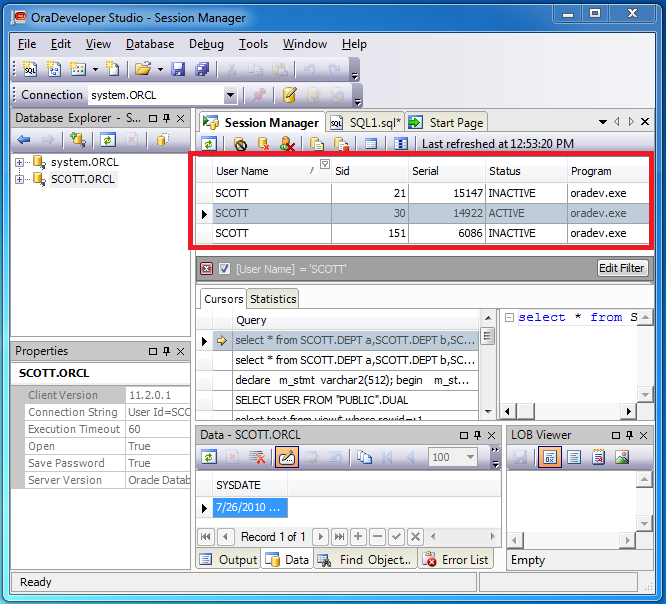
OraDeveloper Studio: Active Sessions
As you can see from the image above SCOTT has created three sessions one of which is active. Let’s create an empty SQL document using the SYSTEM connection and execute the script.
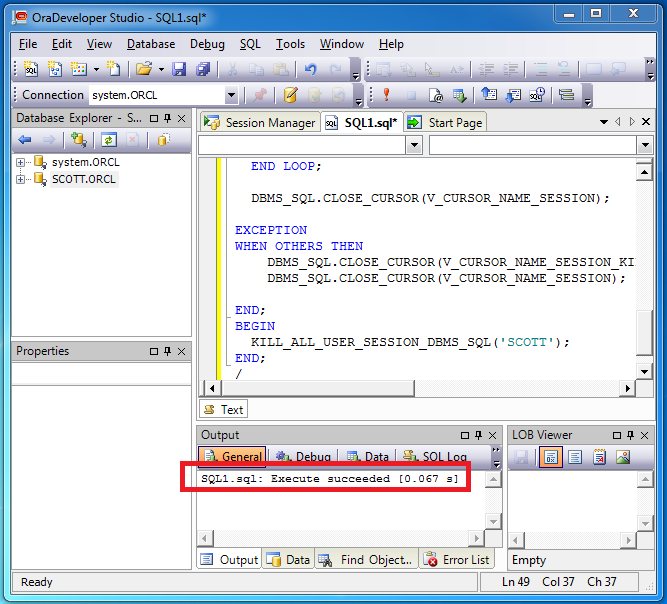
OraDeveloper Studio: Execute Procedure
Now let’s refresh SCOTT’s sessions in the Session Manager window:
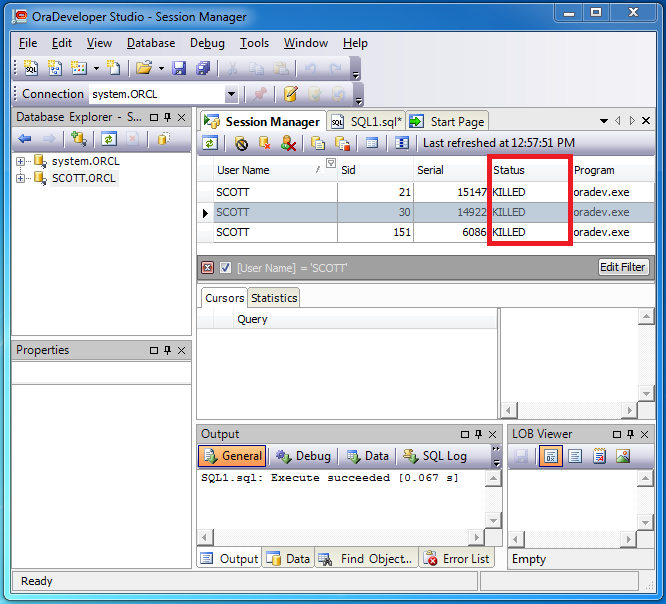
OraDeveloper Studio: Killed Sessions
As you can see on the image above, all SCOTT’s sessions now have the KILLED status, and that’s what we wanted to achieve.
tags: data compare, Oracle, oracle tools