How AI and SQL Automation Are Changing Data Analysis
AI and SQL automation take routine work off analysts, developers, and DBAs. Scheduled data imports and exports, reports, stored procedures, backups, and ETL jobs run without manual steps, and AI assistants turn plain-language requests into SQL, explain queries, and suggest optimizations. Tools such as dbForge Edge, a database IDE with dbForge AI Assistant built in, bring AI help and command-line automation for many of these tasks into one environment.
Today, adopting technology is not a choice, but a necessity. Teams struggle to keep up with the growing volume of data and progressively stricter analysis standards when they rely solely on manual SQL processes. AI and SQL automations fill this gap by turning tedious processes into fast, error-free pipelines.
These tools are revolutionizing the way we work with data. By these tools, we mean technologies that enable instant search, data cleansing, and real-time reporting. This blog post will reveal tools and techniques that allow employees to access better information faster and save time.
Why SQL Automation Matters More Than Ever
Data is multiplying every day, and companies expect insights the moment they need them. SQL script automation helps by automating SQL queries, running scripts and reports automatically, making work quicker, more accurate, and consistent.
This means that teams can spend less time on boring tasks and more time looking for trends, new chances, and better choices.
What Tasks Can You Automate in SQL Today?
How to automate SQL queries? If you’ve worked with SQL for a while, you know how much of your day can disappear into the same old chores.
Importing files, running stored procedures, babysitting backups, it’s important work, but it isn’t the kind that excites anyone. That’s where SQL automation earns its keep.
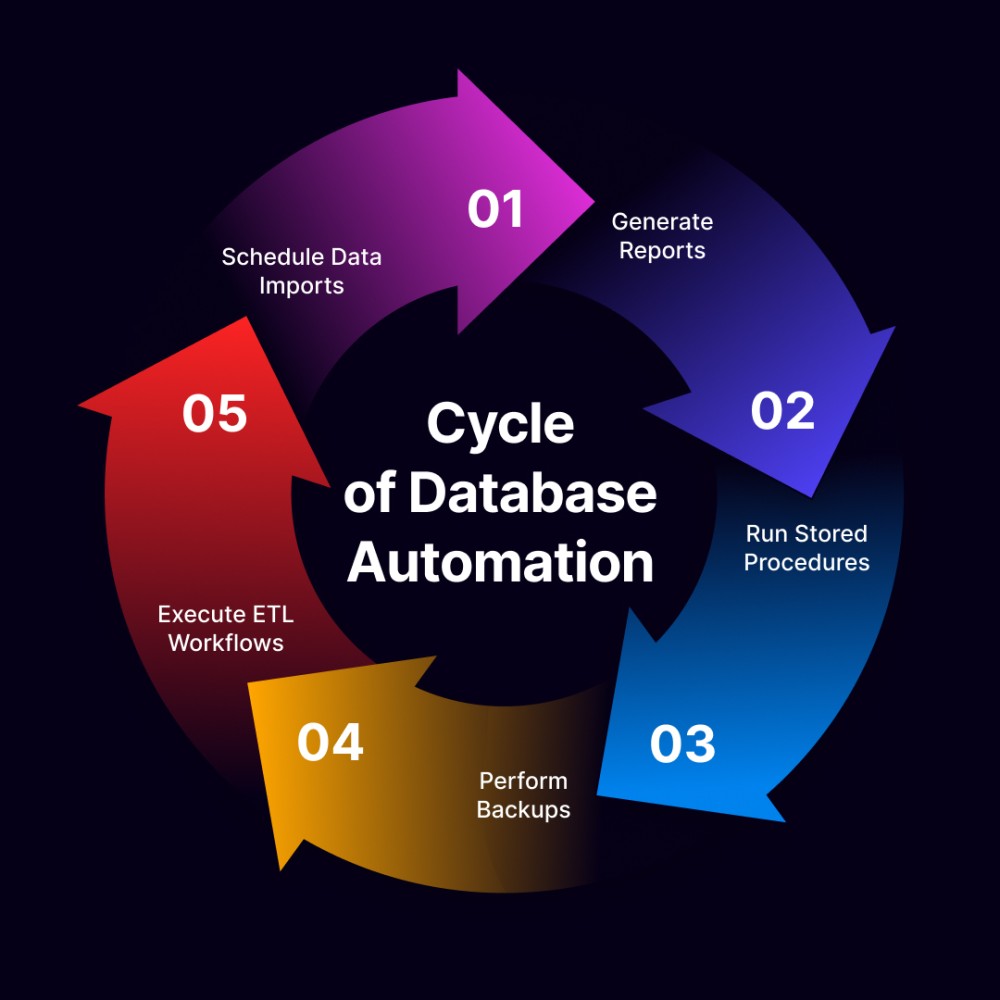
- Scheduled data imports and exports. Think of all the CSVs, sales reports, or logs you’ve uploaded manually. Automation can grab those files on schedule and load them straight into the database, no dragging and dropping required.
- Report generation. Instead of pulling the same monthly revenue chart ten times, set up SQL Server automation and reporting. Managers still get their numbers, but analysts aren’t stuck clicking “refresh” all afternoon.
- Stored procedures. Those long routines you run for calculations? Put them on a schedule and let them roll overnight so the results are waiting in the morning.
- Backups and maintenance. Backups, index rebuilds, and updates may not be glamorous, but they’re essential. Automation keeps them on track, so your database stays healthy without constant check-ins.
- ETL workflows. Moving data between systems by hand is one of the most thankless jobs in IT. An automated pipeline does it reliably and without mistakes.
The result? DBAs reclaim hours they used to lose to routine upkeep, developers deploy faster, analysts stop wasting time on repeat work, and DevOps teams can actually breathe instead of firefighting.
Enter AI: The New Frontier for SQL Automation
AI is changing the way we work with SQL automation. It’s no longer just about automating tasks; it’s about having a smart helper by your side. AI can write SQL queries, spot optimization opportunities, detect anomalies in your data, and even understand natural language instructions. That means less time wrestling with syntax and more time actually working with insights.
From Reactive to Proactive SQL Tasks
AI can point out problems before they become bottlenecks, rather than waiting for slow queries to cause delays. Consider it similar to having a helper who constantly monitors your database to ensure that everything is operating as it should.
Query Generation via Natural Language
You no longer have to remember each and every SQL phrase. AI will take your text and turn it into a valid SQL query. For example, type “show me the best-selling items from last month.” It’s faster, easier, and lets teammates who aren’t tech-savvy look at info too.
How dbForge Edge and AI Assistant Accelerate SQL Automation
This is where dbForge Edge, combined with AI Assistant, really shines. The AI Assistant takes the pain out of writing queries. Just describe what you need in plain natural language, and it builds the SQL for you.
Beyond code and basic SQL automation, dbForge Edge handles comparisons, deployments, and reporting, helping teams manage the full SQL AI tool pipeline without manual effort. With DevOps and CI/CD tools built in, keeping databases consistent and reliable becomes part of the process, not an extra chore.
For DBAs, developers, and analysts, this means fewer errors, faster release cycles, and more time spent on actual problem-solving instead of being stuck in the routines.
Try the free trial and see how AI-powered SQL Server automation can change the way you work with SQL.
The Future Is Automated, and It’s Here
The change is already underway: SQL automation and AI have moved from optional to essential. Teams that embrace them today don’t just save hours of work; they set themselves up to move faster, deliver more reliable results, and make smarter decisions.
Ready to see the difference for yourself? Try dbForge Edge with dbForge AI Assistant for free and see how SQL automation tools can transform your SQL workflows.
FAQ
What is SQL automation? SQL automation means running recurring database tasks, such as data imports and exports, reports, stored procedures, backups, and ETL jobs, on a schedule or from scripts so nobody has to start them by hand.
Which SQL tasks can you automate? The most common are scheduled data imports and exports, report generation, stored procedures, backups and index maintenance, and ETL workflows that move data between systems.
How does AI help with SQL work? AI assistants turn plain-language requests into SQL, explain and troubleshoot queries, and suggest optimizations. dbForge AI Assistant works inside dbForge products and uses database metadata for context. It has no access to the actual data in your databases, and the data it sends is not used to train models.
Is dbForge AI Assistant free? It has a free plan with 200,000 tokens per month. A paid plan raises the limit to 20 million tokens per month and is licensed separately from other dbForge products.
Which dbForge tools automate SQL tasks? dbForge Edge covers SQL Server, MySQL and MariaDB, Oracle, and PostgreSQL in one multidatabase solution. If you work with one database system, Devart also offers dedicated SQL Server tools, including dbForge Studio for SQL Server, a SQL Server IDE that runs schema and data comparison, data import and export, test data generation, and reports from the command line. MySQL users get the same kind of automation in dbForge Studio for MySQL, a MySQL GUI for MySQL and MariaDB.
tags: sql, automation, ai, database